Why do TFT displays from some manufacturers appear more yellowish than others?
In Brief
- Different color filter materials and, above all, their thickness are the main reasons why TFT displays appear more yellowish or neutral depending on the manufacturer.
- The LED backlight and its color temperature (LED bins) also have a significant influence on the white point and can visibly alter the color impression.
- Optical add-on layers such as polarizing filters, OCA, or touch layers have an amplifying effect, but the decisive color deviations arise at the panel level due to color filters and backlighting.
⏱ Estimated reading time: 7 minutes
Manufacturer-specific color differences
In industrial applications, consistent color reproduction over many years is crucial. At the start of a project, a specific TFT display is usually qualified, whose optical appearance should remain stable throughout the entire product life cycle. However, if this panel is discontinued at some point, a successor model often has to be approved. This model often comes from a different manufacturer—despite having identical specifications such as size, resolution, or connection.
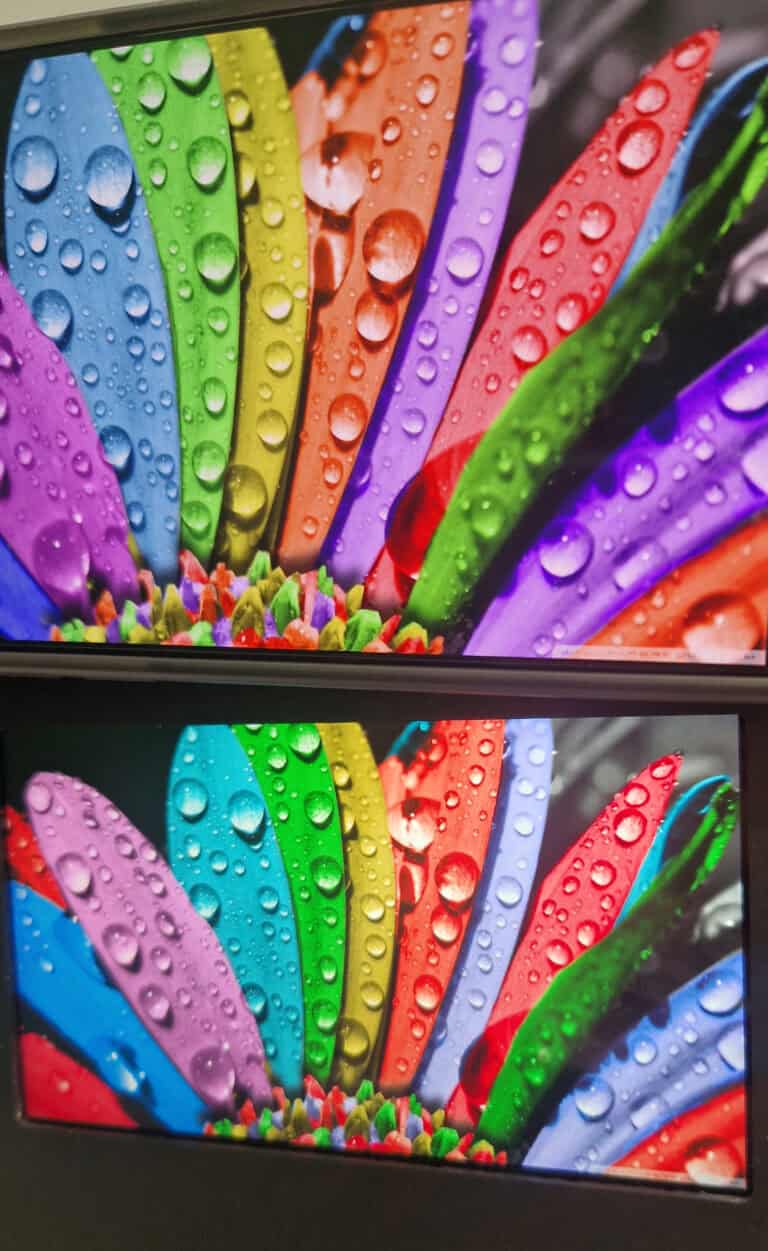
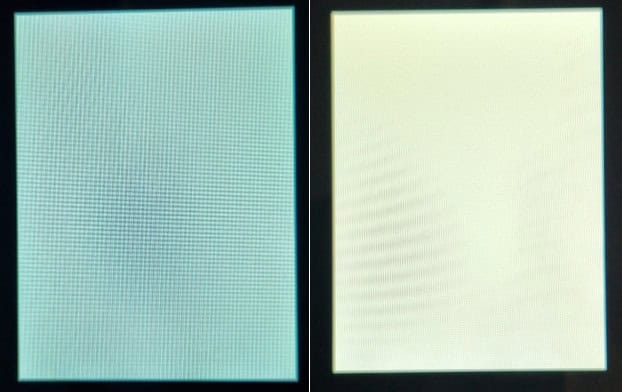
This is where significant visual differences arise: the new screen often looks visibly different. The white point in particular can be significantly warmer, yellower, or more neutral. These deviations are not a coincidence, but rather the result of fundamental differences in the material composition and technical philosophy of the respective display manufacturers.
The most important influencing factors are the color filter, the thickness of the color filter, the LED backlight, and the optical layers in the stack. This article explains in detail why TFT displays from different manufacturers appear different despite having the same data sheets.
How a TFT display gets its color
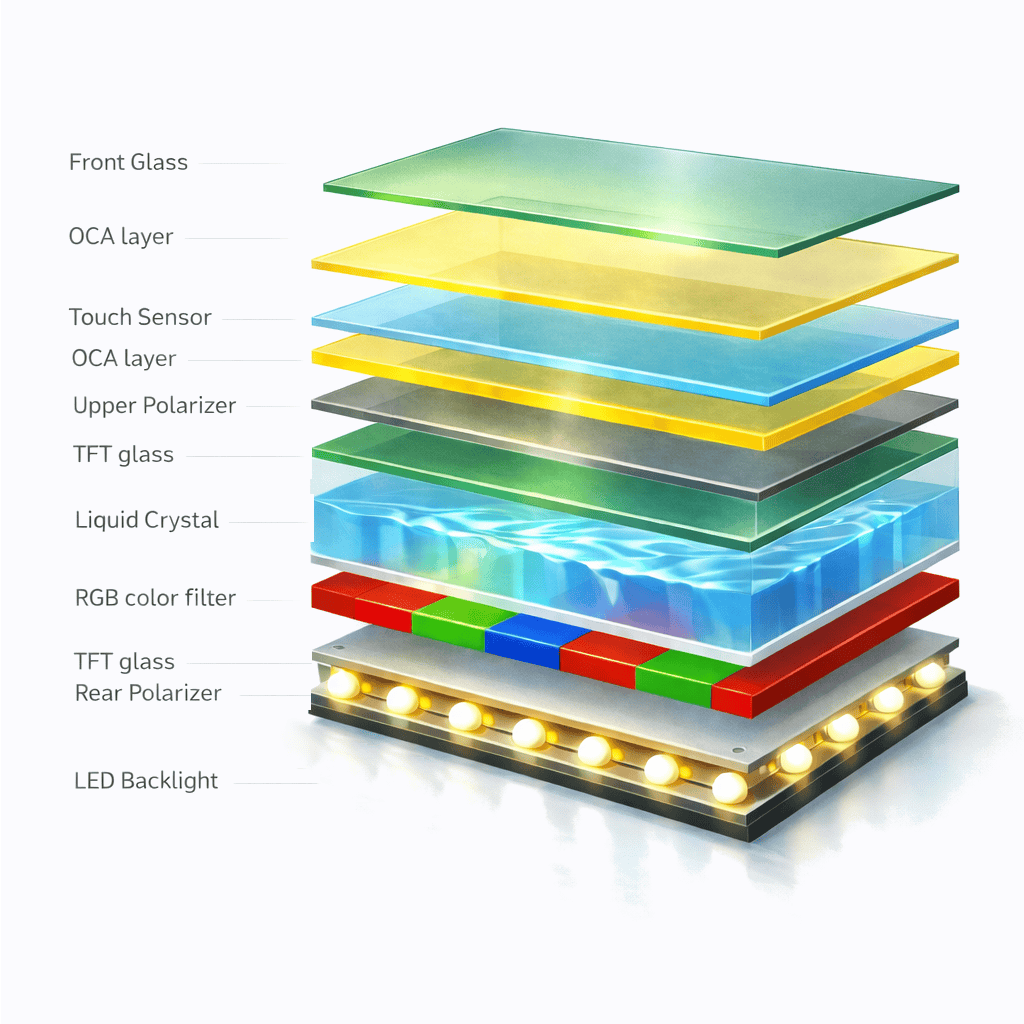
A TFT LCD does not actively generate colors. Instead, it allows light from the backlight to pass through several layers. The following are particularly important:
- Color filter (RGB)
- LED backlight
- liquid crystal layer
- polarizing filter
- OCA adhesive
- Touch or cover glass
Each of these layers changes the spectrum of the transmitted light. The color filters and backlight have the strongest influence on the visible white point and color saturation.
Why manufacturers differ in color
The color filters
Each manufacturer uses its own pigment mixtures, filter widths, and transmission curves for the RGB subpixels. Even small spectral shifts in the green or red channel are enough to make white appear visibly warmer or cooler. Manufacturers have different target markets (industrial, consumer, automotive) and optimize their color filters accordingly.
The thickness of color filters – a key factor that is often underestimated
A crucial factor that explains many manufacturer-specific white points is the thickness of the color filter layers. This determines how selectively the light is filtered.
Thicker color filters absorb unwanted wavelengths more strongly and precisely.
The result:
- deeper, more defined color spectrum
- higher color saturation
- Warmer, partially more yellowish white, as less unfiltered spectrum is transmitted.
Thinner color filters allow more unfiltered light to pass through.
The result:
- brighter, more neutral white
- lower color depth
- partially "flatter" color space
Manufacturers who use thin color filters therefore often appear more neutral and whiter; manufacturers with thicker pigment layers tend to appear warmer and more yellowish.
LED backlight and LED binning
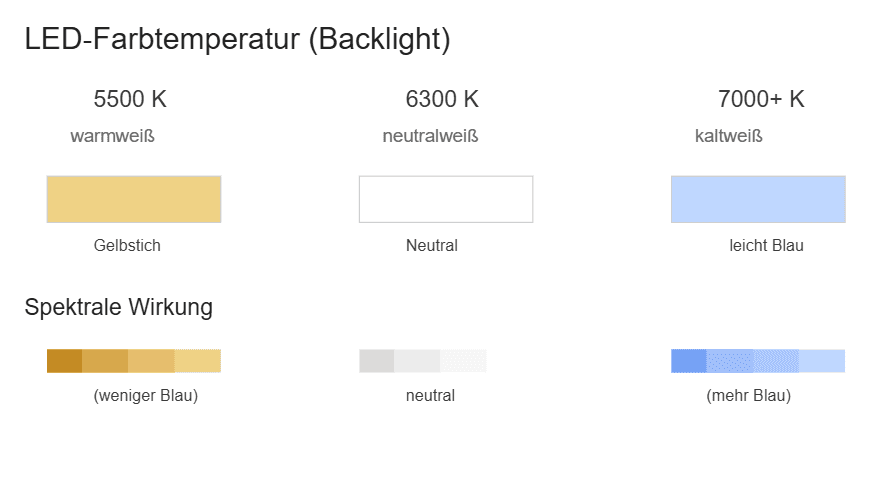
The backlight is also a significant influencing factor. LEDs differ in their color temperature:
- Warm white (≈ 5500–6000 K) → yellowish
- neutral white (≈ 6300–7000 K) → neutral
- cool white (>7000 K) → bluish
Manufacturers choose LED bins based on efficiency, cost, and supply chain. Some brands traditionally work with warmer LEDs, while others use neutral or cooler variants. This means that two technically identical panels can look completely different.
Polarizing filters, OCA, and touch layers
Polarizing filters absorb certain wavelengths more strongly. Some are more UV-stable, others are particularly light-transmissive. Depending on the type, this can reduce blue tones, making a display appear warmer.
OCA adhesives and touch sensors also have spectral transmission, which may be slightly yellowish.
However, it is important to note that:
The main reason for color differences is almost always due to the manufacturer (color filters + LEDs).
The optical layers act as amplifiers—not as the cause.
Influence of TFT components on color representation
| Part of the TFT module | Influence on color | strength of influence | Typical effect | adjusting screw |
|---|---|---|---|---|
| Color filter (material) | Basic spectral characteristics | very high | warm/cold, color space | manufacturer selection only |
| Color filter (thickness) | Strength of color separation | very high | Thicker = warmer/deeper; thinner = lighter/more neutral | panel design only |
| LED backlight / LED bins | Color temperature, blue component | very high | yellowish vs. neutral | Define LED bins |
| polarizing filter | wavelength absorption | medium | reduced blue components | Polarizing filter type |
| OCA adhesive | minimal tint | low–medium | mild warmth | OCA material |
| Touch layers | transmission | low–medium | minor changes | Touch layer type |
| LC cell | Gamma, brightness | low–medium | contrast impression | calibration |
| cover glass | minimal color deviation | low | rarely visible | iron-free glass |
| Firmware/RGB calibration | compensation | medium | warm/cold adjustable | LUT/RGB adjustment |
Relevance in discontinuation announcements and second-source strategies
In industry, it is important to have an identical white point throughout the entire product life cycle. For this reason, a display source is qualified at the start of the project.
If the product is discontinued later, a replacement panel is often from a different manufacturer—and differs in color. This can often be explained by technical reasons:
- other color filter materials
- different filter thicknesses
- deviating LED bins
- variable polarizing filters
- other OCA materials
To evaluate a potential successor, it is advisable to:
- White point measurement (CIE xy)
- Spectral analysis of the backlight
- Evaluation of color filter transmission
- Comparison of the optical stack
- Calibration via RGB correction (if possible)
Support in selecting a suitable successor
We know from experience that color-matched replacements cannot be found by chance, but require systematic analysis. Thanks to our many years of experience with different TFT manufacturers and their specific color characteristics, we are very well placed to assess which panels are suitable as replacements—whether through color filters that are as identical as possible, similar filter thicknesses, or adjustment of the LED backlight.
In many cases, an almost identical visual appearance can be achieved, either by selecting a panel with very similar spectral properties or by making specific adjustments such as LED bin definitions or RGB calibration. This allows us to ensure that a product remains visually consistent even when discontinued, and that there are no visible color differences for end customers.
glossary
Color filters – RGB pigment filters that define the spectrum and color space.
Color filter thickness – affects selectivity and white point.
Backlight (LED) – light source of the panel; defines color temperature.
Polarizing filter – polarization filter for controlling the LC layer.
OCA – optically clear adhesive between the panel and cover glass.
White point – color temperature of the white displayed.

FAQ
The white tone of a TFT is not only determined by the LEDs, but also by the color filters used, the LC structure, and the optical layers such as diffusers and prism films. Some manufacturers deliberately use warmer color filters or LC mixtures because they prioritize stable colors, higher temperature tolerance, or better uniformity. This results in a white point that appears more yellowish overall compared to other panels.
Yes, the white point can be significantly improved using gamma settings, color profiles, or an external colorimeter. However, the achievable accuracy depends on the panel type and backlight quality.
Yes – color deviations can be significantly reduced by adjusting gamma, color temperature, and RGB gain. In addition, high-quality color filters, better-matched LC mixtures, and optimized optical films such as diffuser or prism sheets have a positive effect on white point stability. However, complete neutralization is only possible within the typical panel tolerances.
Due to their LC structure and viewing angle dependency, TN panels often have a less stable white point, which can shift depending on the viewing angle. IPS and VA panels generally offer more consistent white representation, but still differ in terms of color filters, LC mixtures, and backlight concepts.
Yes, white point and color deviation are often specified using CIE xy coordinates and ΔE values, for example. In practice, tolerance windows are defined within which all panels in a series must lie—but perfectly identical display across all devices is technically almost impossible to achieve.